ca-policy-analyzer
CA Policy Analyzer
Analyze your Entra ID Conditional Access policies for best practices, FOCI token-sharing risks, known CA bypasses, CIS v6.0 benchmark alignment, and MS Learn documented exclusions — directly in your browser, no install required.




🚀 Try It Now
No download. No install. No server.
👉 [https://pushai2026.github.io/ca-policy-analyzer/)
- Click Connect Tenant
- Sign in with your Entra ID credentials
- Click Run Analysis
- Explore the six analysis tabs: Dashboard, Policies, Findings, Templates, CIS, and MS Learn
- Click Export JSON to download the full analysis results
The app runs 100% in your browser — your data never leaves your machine. It connects directly to Microsoft Graph using your own credentials (delegated permissions).
Recent Changes
v1.9.0 — Custom GitHub Template Comparison (April 17, 2026)
- Compare against any public GitHub CA policy repo — new “Compare Custom Repo” button on the Templates tab
- Accepts full GitHub URLs, branch/path deep links, or
owner/reposhorthand - Auto-detects JSON files, converts Graph API policy exports into templates with auto-generated fingerprints
- Break-glass severity fix: disabled policies → low, report-only → medium
- Entra Connect version corrected to v2.5.76.0; DirSync check now links to version history
v1.8.0 — Per-Policy Break-Glass Annotations (April 11, 2026)
- Every CA policy now shows break-glass status — info/high/medium/low annotations on ALL policies, not just 7 critical types
- Tenant-wide summary shows total coverage — “X of Y policies” with full breakdown (total, user-targeting, with/without counts)
- Severity-aware: block+allUsers+allApps = high, MFA/compliance+allUsers = medium, others = low, disabled/report-only = info
- Extracted reusable
identifyBreakGlass()helper shared by per-policy and tenant-wide checks
v1.7.0 — Resource Exclusion Enforcement & License Fix (April 11, 2026)
- Resource Exclusion Bypass Check updated for Microsoft’s March–June 2026 enforcement rollout
- New tenant-wide “Low-Privilege Scope Enforcement” check — detects “All resources” policies affected by the rollout
- Fixed Workload Identity Premium license detection — now checks both
AAD_WRKLDID_P1andAAD_WRKLDID_P2
See CHANGELOG.md for full details.
Screenshots
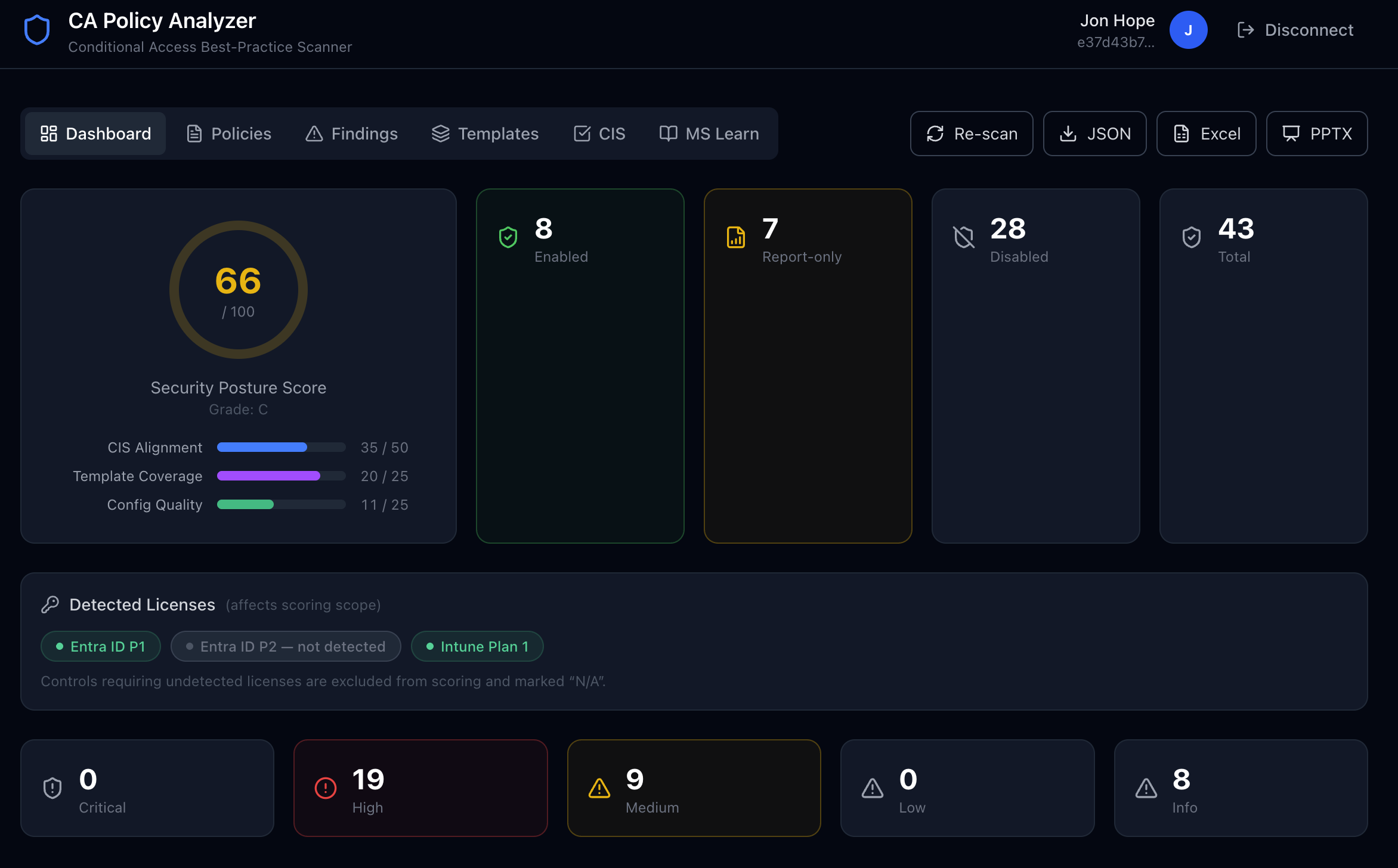
Dashboard — Security Posture at a Glance
The dashboard shows your overall security score (0–100), policy counts by state, and a severity breakdown of all findings.
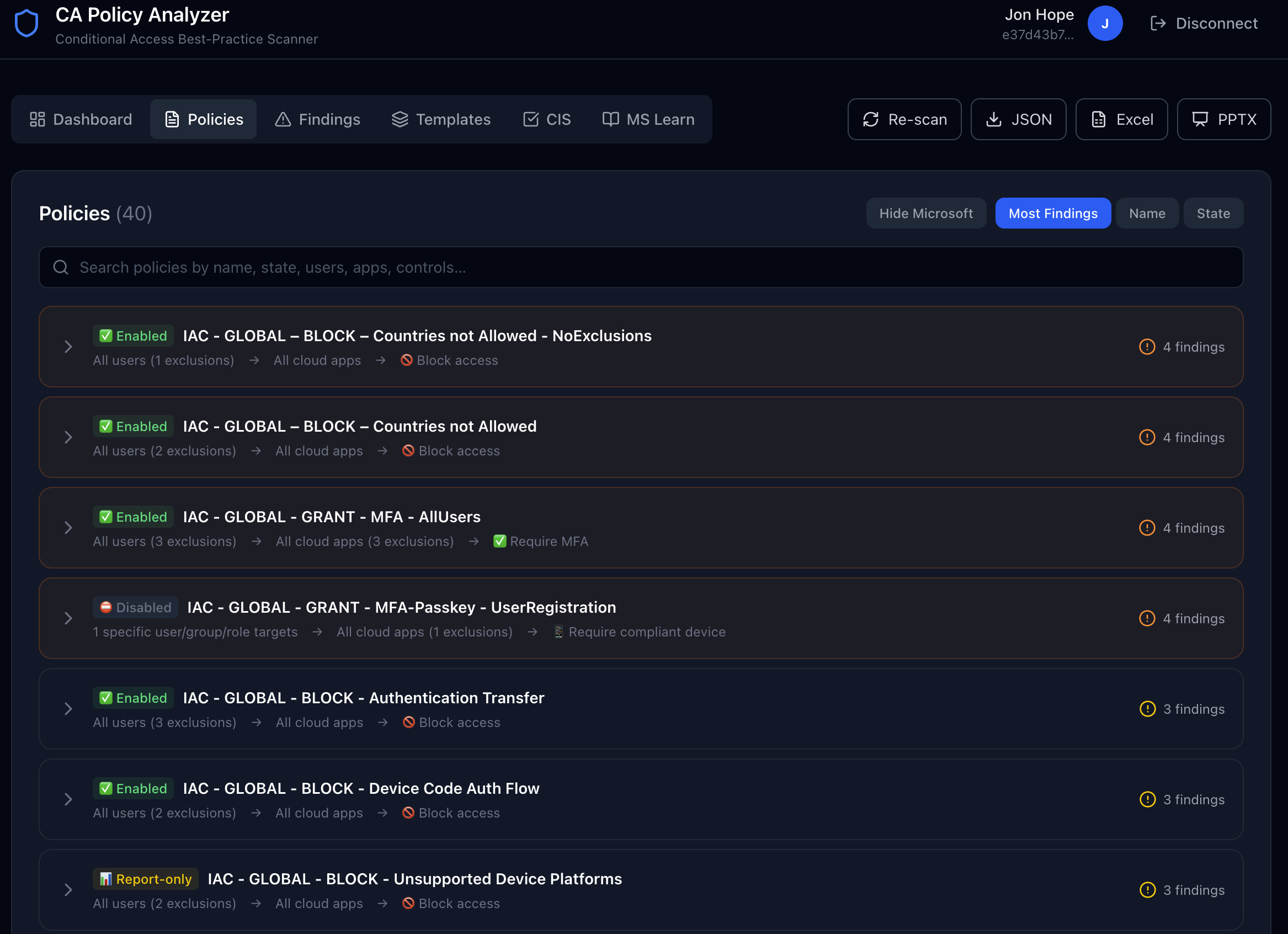
Policies — Visual Flow Cards
Every CA policy is rendered as an expandable flow card showing Users → Conditions → Apps → Grant/Session Controls. Critical and high-severity policies are highlighted with coloured borders.
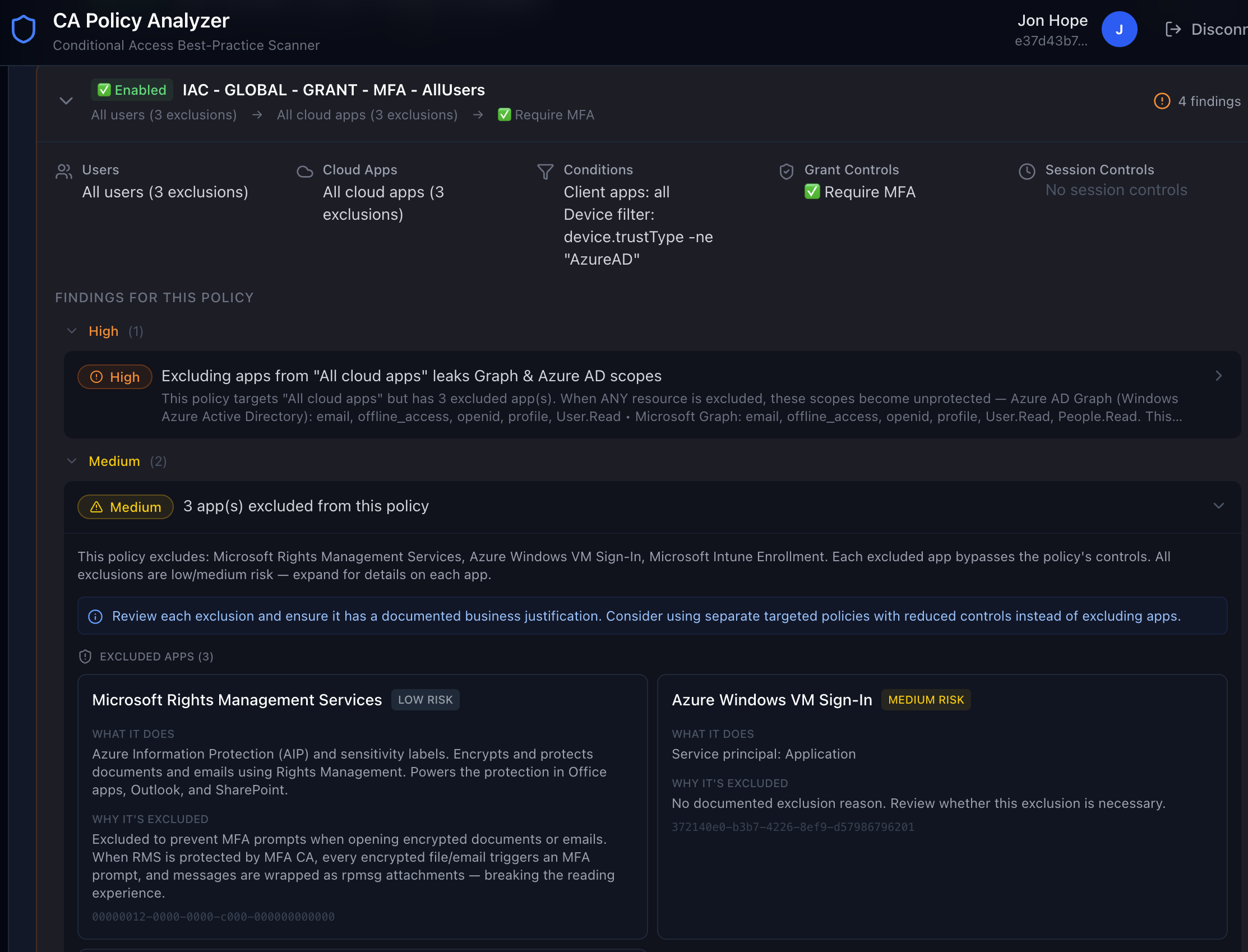
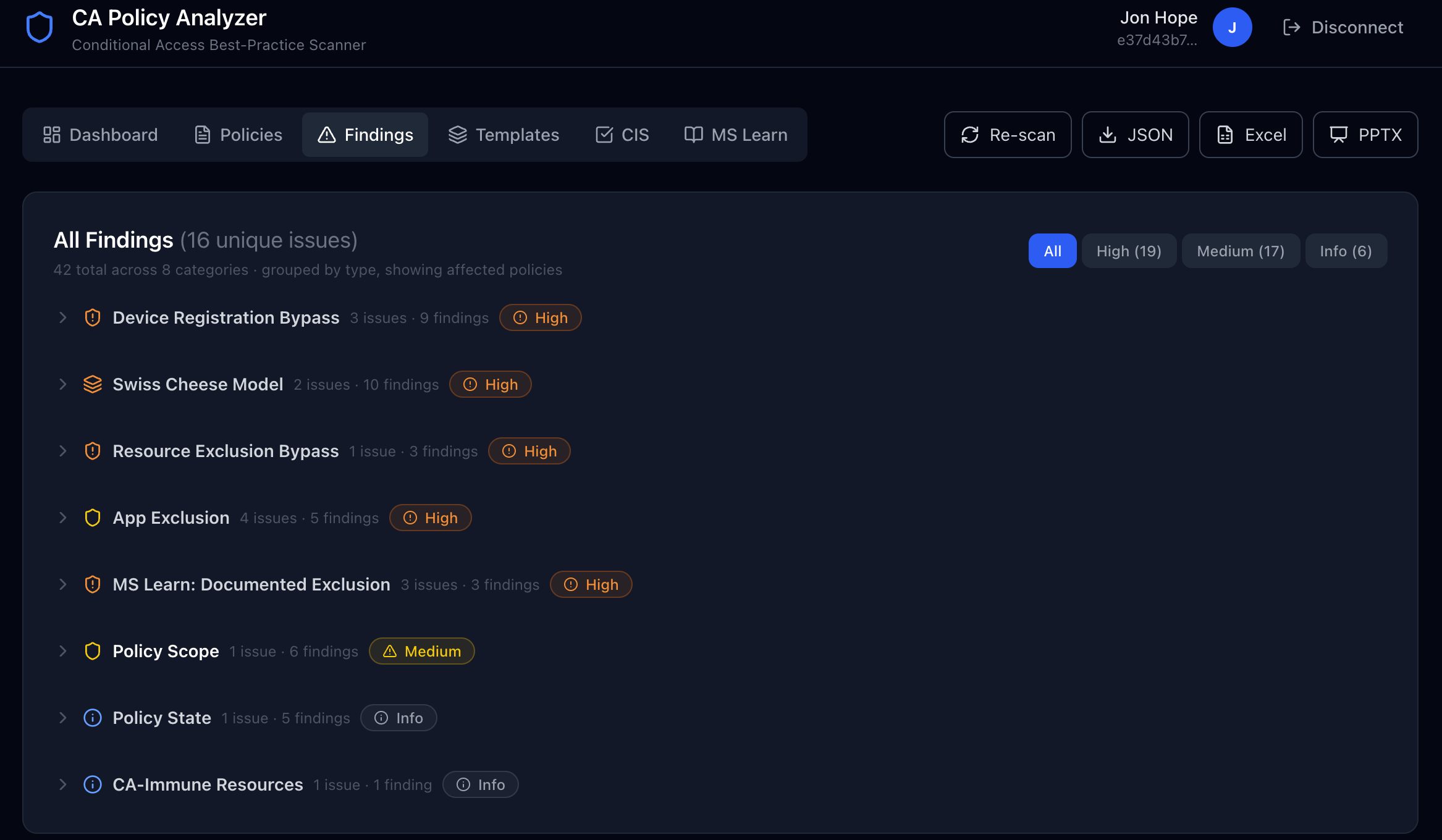
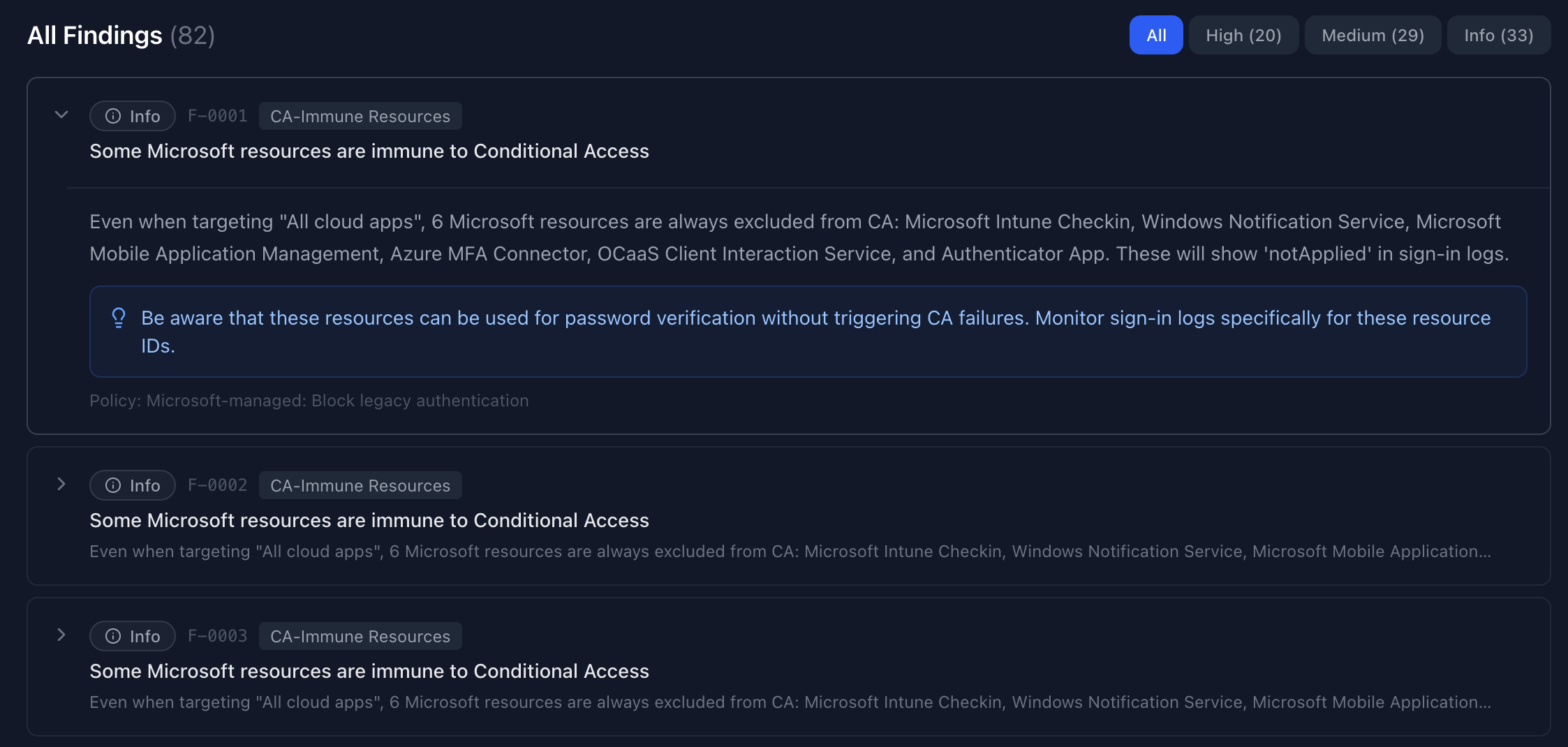
Findings — Severity-Ranked Issues
All detected issues ranked Critical → Info. Expand any finding to see the full description, affected policy, and a remediation recommendation.
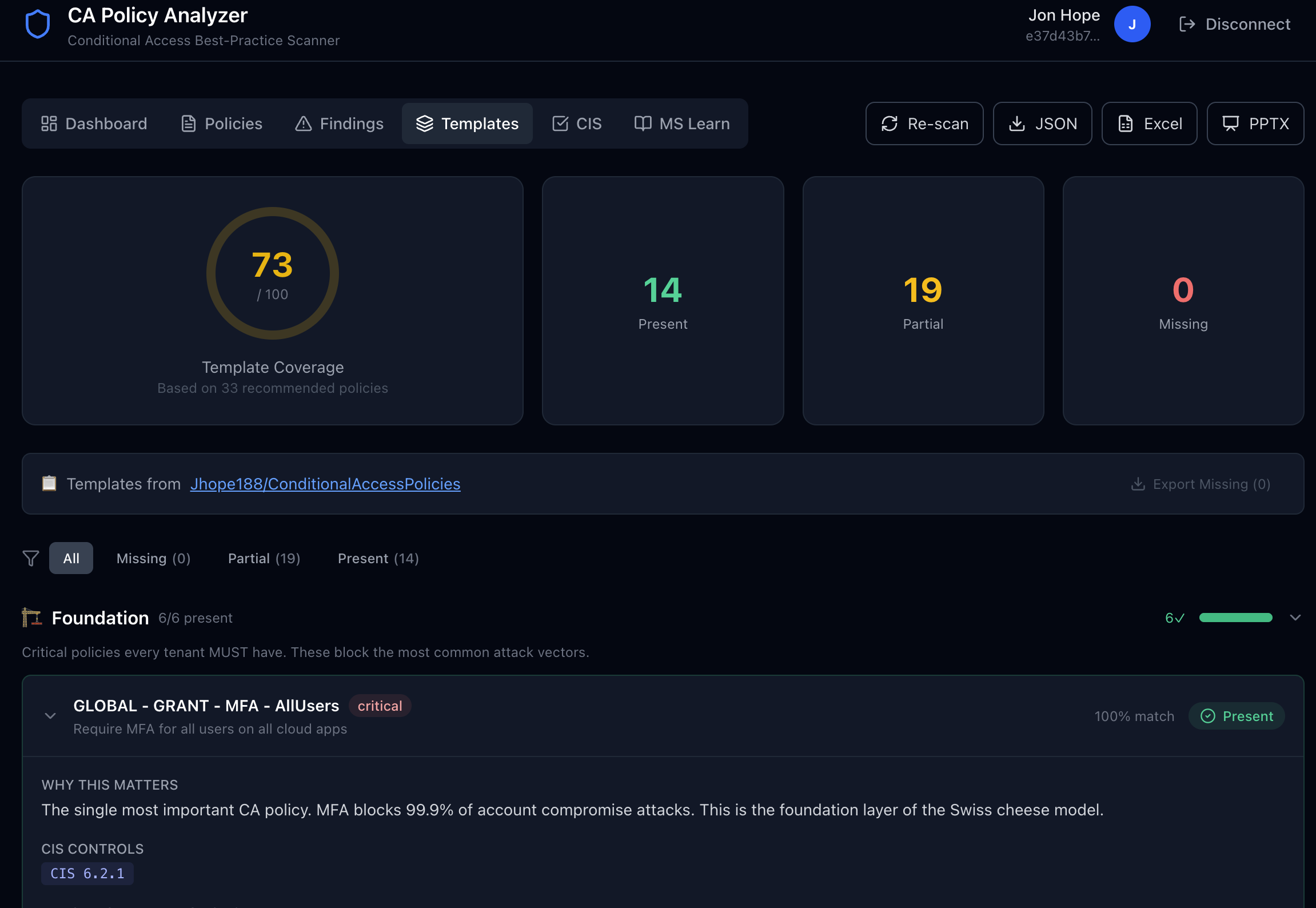
Templates — Gap Analysis
39 best-practice templates (including Workload Identity) compared against your tenant. Each template shows whether you have a matching policy, a partial match, or a gap.
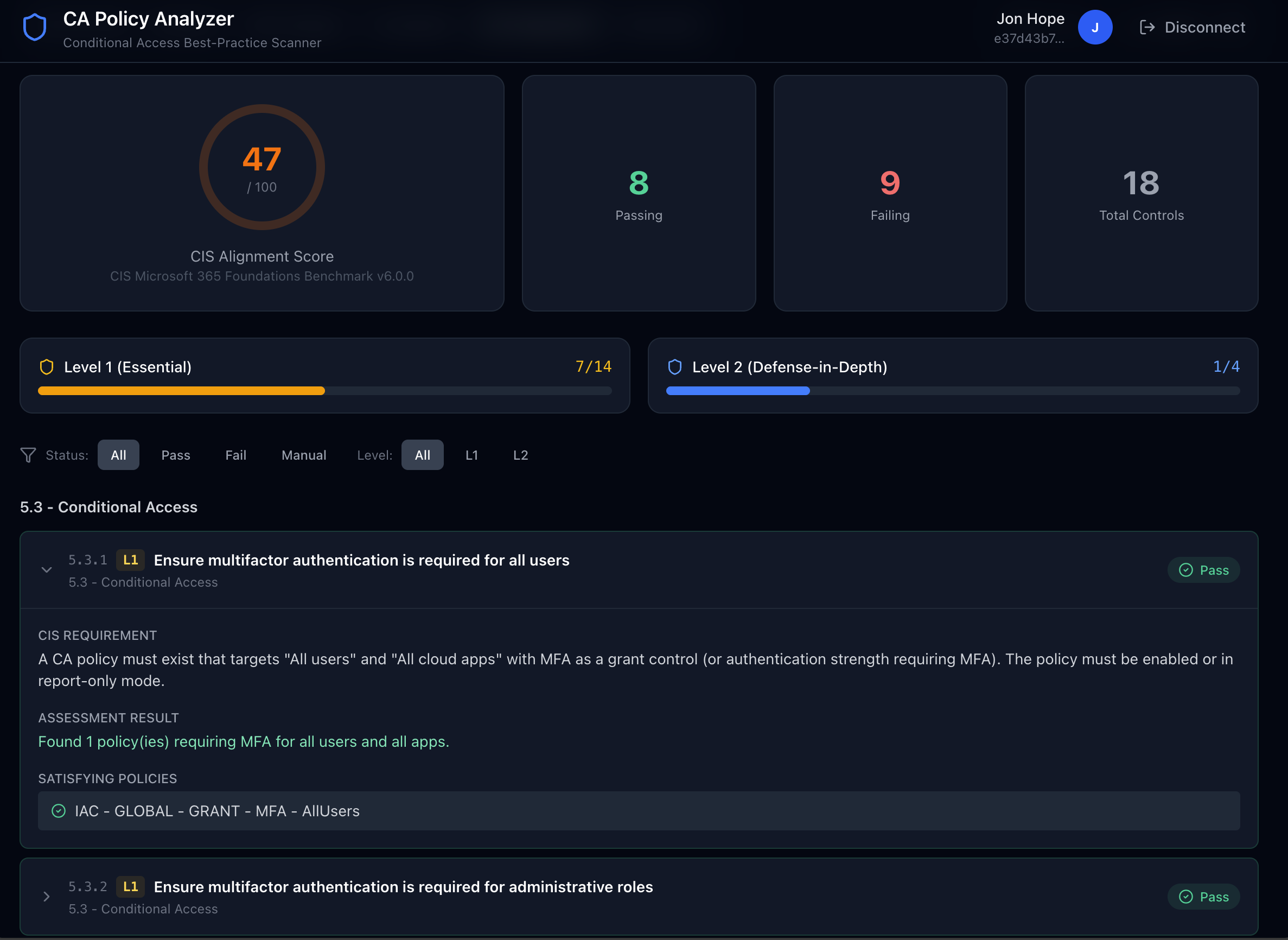
CIS v6.0 — Benchmark Alignment
18 controls from the CIS Microsoft 365 Foundations Benchmark v6.0.0 with an alignment score ring. Each control shows pass/fail status, matching policies, and remediation guidance.
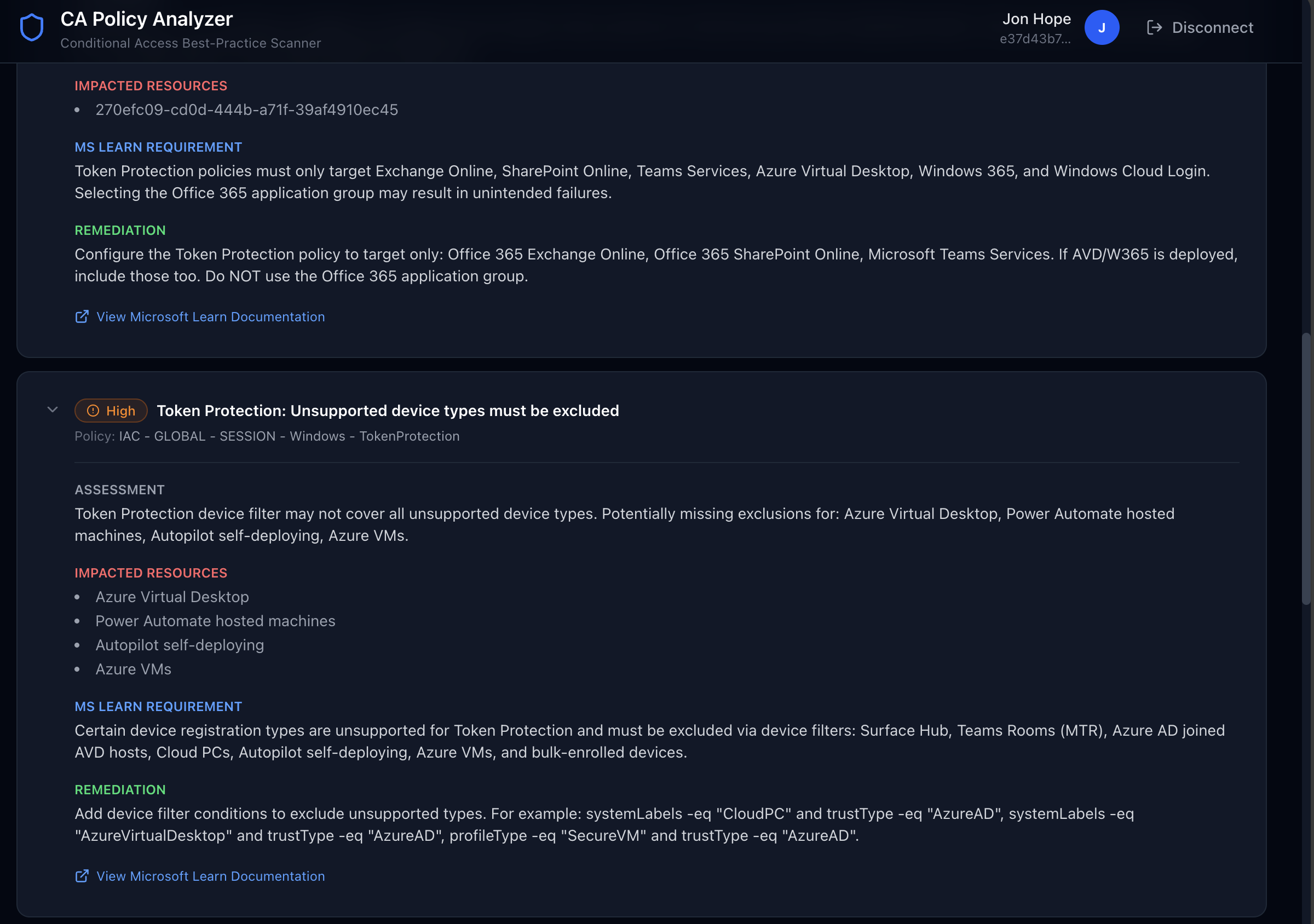
MS Learn — Documented Exclusion Checks
17 checks sourced from Microsoft Learn flag policies that are missing required exclusions or using deprecated grant controls. Findings are grouped by check type — similar policies are consolidated under a single card showing all affected policies.
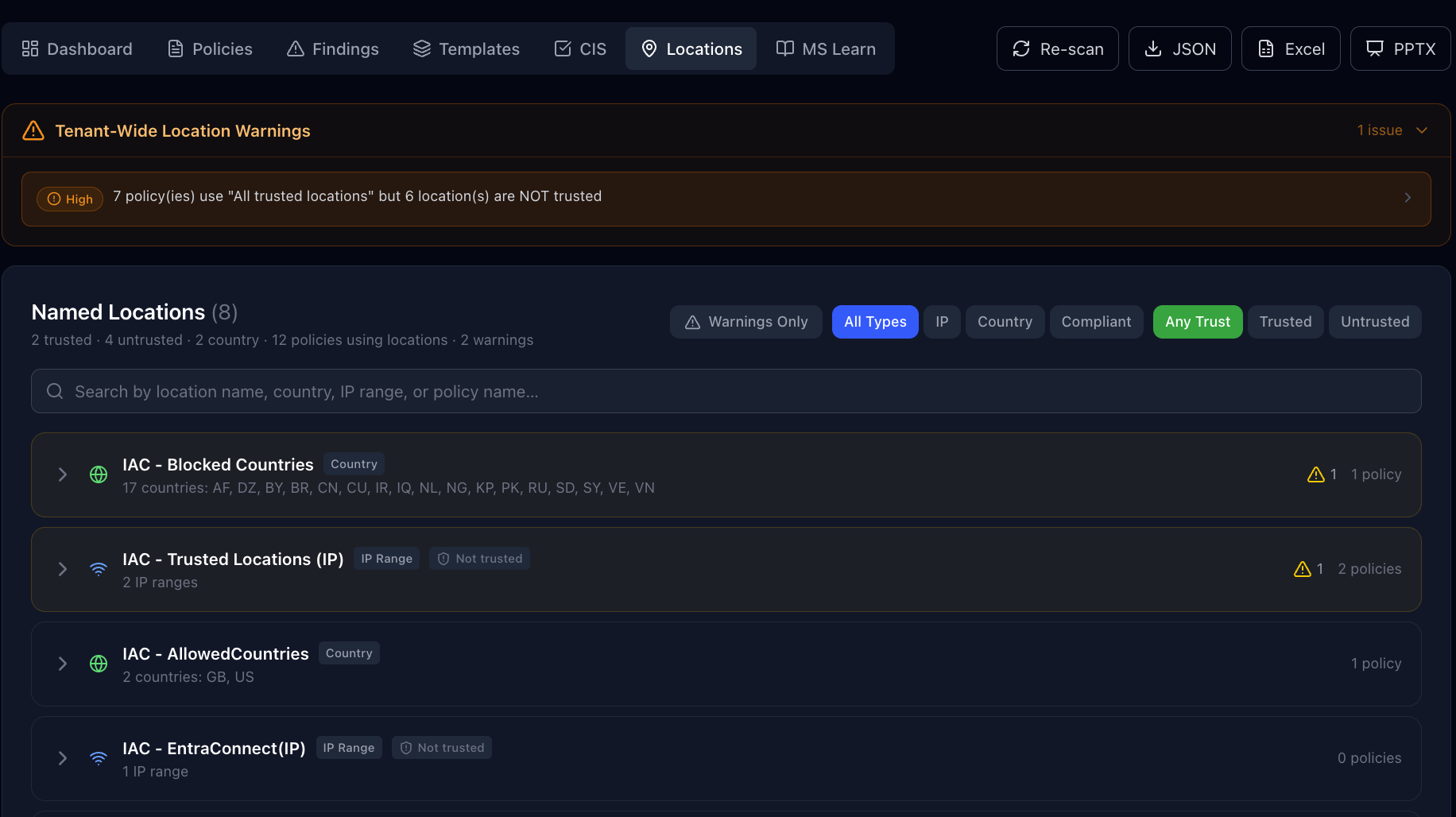
Locations — Named Location Cross-Reference
The Locations tab maps every named location (IP ranges, countries, compliant networks) to the Conditional Access policies that reference it — showing whether each location is used as an include or exclude condition. It flags orphaned references, untrusted locations used with “All Trusted Locations”, empty country lists, and overly broad IP ranges.
What It Does
CA Policy Analyzer connects to your Entra ID tenant via Microsoft Graph and:
- Reads all Conditional Access policies including users, apps, conditions, and grant/session controls
- Checks for best-practice violations using research from Fabian Bader and EntraScopes.com
- Detects FOCI risks — if a policy excludes one FOCI app, ALL 45+ family members can share tokens
- Flags known CA bypasses including CA-immune resources, Device Registration Service bypass, resource exclusion scope leaks, and more
- Generates a Security Posture Score (0-100) with severity-ranked findings and actionable recommendations
- Visualizes each policy showing the flow: Users → Conditions → Apps → Grant Controls
- Detects Microsoft-managed CA policies — identifies Microsoft-managed policies in your tenant (legacy auth block, device code flow block, admin MFA, etc.) and flags potential overlap with custom policies
- Surfaces active advisories — CIS controls display relevant M365 Message Center and MS Learn advisories including the approved client app retirement (March 2026), legacy ID Protection risk policy retirement (October 2026), SPO OTP → Entra B2B migration, and Baseline Security Mode policy drafts
Security Posture Scoring
The Security Posture Score is a composite 0–100 score built from three weighted pillars. This ensures the score reflects CIS compliance, best-practice coverage, and real configuration quality — not just one dimension.
Three-Pillar Model
| Pillar | Max Points | What It Measures |
|---|---|---|
| CIS Alignment | 50 | Weighted pass rate of CIS L1/L2 benchmark controls |
| Template Coverage | 25 | How well your policies match the 37 best-practice templates |
| Configuration Quality | 25 | Deductions based on severity of detected findings |
Pillar 1: CIS Alignment (50 points)
The CIS component is the dominant factor. Each of the 19 CIS v6.0.0 controls is weighted by level:
- L1 (Essential) controls carry 3× weight — these are baseline controls every tenant must have
- L2 (Defense-in-depth) controls carry 1× weight — hardening measures for advanced security
- Controls marked N/A (missing license) are excluded from the calculation
| CIS Result | Points Earned |
|---|---|
| Pass | Full weight (3× for L1, 1× for L2) |
| Manual | 50% of weight |
| Fail | 0 |
The formula: cisScore = (weightEarned / weightTotal) × 50
Pillar 2: Template Coverage (25 points)
Uses a priority-weighted coverage score across the 37 best-practice policy templates. High-priority templates (MFA, legacy auth block, device compliance) contribute more to this score than optional hardening templates.
The formula: templateScore = (coverageScore / 100) × 25
Pillar 3: Configuration Quality (25 points)
Starts at 25 and deducts points for each security finding. Per-severity caps prevent a single category from consuming the entire budget:
| Severity | Deduction per Finding | Cap |
|---|---|---|
| Critical | 5 pts | 15 pts max |
| High | 1.5 pts | 10 pts max |
| Medium | 0.5 pts | 8 pts max |
| Low | 0.25 pts | 3 pts max |
Total deductions are also capped at 25 (the full budget).
Letter Grades
| Grade | Score Range |
|---|---|
| A | 90 – 100 |
| B | 80 – 89 |
| C | 65 – 79 |
| D | 50 – 64 |
| F | 0 – 49 |
Example Score Breakdown
CIS Alignment:        42 / 50  (all L1 passing, 2 L2 failing)
Template Coverage:    19 / 25  (76% weighted coverage)
Configuration Quality: 18 / 25  (2 critical, 1 high finding)
───────────────────────────────
Overall Score:         79 / 100  → Grade: C
- Suggests missing policy templates from Jhope188/ConditionalAccessPolicies — 40 best-practice templates matched against your existing policies
- Measures CIS v6.0 alignment — 18 controls from CIS Microsoft 365 Foundations Benchmark v6.0.0 with pass/fail scoring and active advisories from M365 Message Center
- Flags MS Learn documented exclusions — 17 checks for missing exclusions that Microsoft documents as required (Surface Hub, Teams Rooms, break-glass accounts, token protection prerequisites, Azure VM sign-in, Directory Sync accounts, External Authentication Methods, approved client app retirement, etc.)
- Exports full analysis as JSON — download your results for offline review or integration with other tools
- License-aware scoring — detects your tenant’s Entra ID P1, P2, Intune Plan 1, and Workload Identities Premium licenses via the
/subscribedSkusendpoint and adjusts scoring accordingly. Templates and CIS controls that require licenses you don’t have are marked N/A and excluded from gap/pass-fail calculations, so your score reflects only what is achievable with your current licensing. - Workload Identity policy templates — recommends CA policies for service principals (Entra Connect sync, risky workload identities) that require Workload Identities Premium
- Entra ID sync attack database — 8 attack vectors sourced from Cloud-Architekt/AzureAD-Attack-Defense covering credential extraction, certificate backdoors, token replay, and soft/hard match takeover with MITRE ATT&CK TTP mappings
Interface
The app has six tabs accessible after running an analysis:
| Tab | What It Shows |
|---|---|
| Dashboard | Security posture score (0–100), severity breakdown, risk category distribution, and at-a-glance stats |
| Policies | Every CA policy visualized as a flow card: Users → Conditions → Apps → Grant/Session Controls |
| Findings | All detected issues ranked by severity (Critical → Info) with affected policies and remediation guidance |
| Templates | 39 best-practice policy templates compared against your tenant — shows matched, partial, and missing policies including Workload Identity policies |
| CIS | CIS Microsoft 365 Foundations Benchmark v6.0.0 alignment — 18 controls across sections 5.3 (Conditional Access) and 5.4 (Identity Protection & Device Controls) |
| MS Learn | Documented exclusion checks sourced from Microsoft Learn — flags policies missing required exclusions for token protection, Surface Hub, Teams Rooms, break-glass, CAE, and more |
Export / Download
Click the Export JSON button (visible when results are loaded) to download the complete analysis as a JSON file, including all findings, CIS results, exclusion checks, and raw policy data.
Key Checks
| Category | What It Detects |
|---|---|
| FOCI Token Sharing | Excluded apps that belong to the Family of Client IDs — tokens interchangeable across 45+ Microsoft apps |
| Resource Exclusion Bypass | Excluding ANY app from “All cloud apps” leaks Azure AD Graph & MS Graph basic scopes |
| CA-Immune Resources | 6 Microsoft resources completely excluded from CA enforcement (always notApplied) |
| Device Registration Bypass | Device Registration Service ignores location and device compliance — only MFA works |
| Swiss Cheese Model | Grant controls using OR instead of AND, missing MFA baseline layer |
| Legacy Authentication | Legacy auth clients targeted but not blocked |
| Known CA Bypass Apps | Apps with documented CA bypass capabilities (Azure CLI, PowerShell, AAD Connect, etc.) |
| Tenant-Wide Gaps | Missing MFA-for-all, no legacy auth block, no break-glass accounts |
CIS Benchmark Controls (v6.0.0)
18 controls from CIS Microsoft 365 Foundations Benchmark v6.0.0:
| Control | Title | Level |
|---|---|---|
| 5.3.1 | MFA required for all users | L1 |
| 5.3.2 | MFA required for administrative roles | L1 |
| 5.3.3 | MFA required for guest and external users | L1 |
| 5.3.4 | Phishing-resistant MFA for administrators | L1 |
| 5.3.5 | MFA required to register or join devices | L1 |
| 5.3.6 | Sign-in risk policy configured | L1 |
| 5.3.7 | User risk policy configured | L1 |
| 5.3.8 | Access from non-allowed countries blocked | L1 |
| 5.3.9 | Legacy authentication blocked | L1 |
| 5.3.10 | Continuous access evaluation not disabled | L1 |
| 5.3.11 | Unknown/unsupported device platforms blocked | L1 |
| 5.3.12 | Device code flow blocked | L1 |
| 5.3.13 | Sign-in frequency for admin portals limited | L2 |
| 5.4.1 | High-risk users blocked | L1 |
| 5.4.2 | High-risk sign-ins blocked | L1 |
| 5.4.3 | Compliant device requirement configured | L2 |
| 5.4.4 | Token protection for sensitive applications | L2 |
| 5.4.5 | App protection policy for mobile devices | L2 |
MS Learn Documented Exclusion Checks
16 checks sourced from Microsoft Learn documentation:
| Check | Severity | What It Flags |
|---|---|---|
| Token Protection — Apps | High | Targeting “All apps” instead of only Exchange/SPO/Teams/AVD/W365 |
| Token Protection — Platform | High | Not restricting to Windows-only + desktop clients |
| Token Protection — Devices | High | Missing Surface Hub, Teams Rooms, Cloud PC device exclusions |
| Break-glass accounts | Critical | All Users enforcement policies with no user exclusions |
| Surface Hub — MFA | Medium | MFA/compliance policies without Surface Hub exclusion |
| Teams Rooms — MFA | Medium | MFA/auth strength policies without Teams Rooms exclusion |
| Teams Rooms — Sign-in frequency | Medium | Sign-in frequency causing periodic sign-outs |
| Device code flow — Teams Android | Medium | Blocking device code breaks Teams Android remote sign-in |
| Defender Mobile | Medium | Restrictive policies without Defender ATP exclusion |
| Azure VM Sign-In — MFA | Medium | MFA/compliance policies without Azure VM Sign-In app exclusion |
| CAE disabled | High | Policies explicitly disabling continuous access evaluation |
| Sign-in frequency — Individual services | Medium | Targeting individual M365 services breaks Teams |
| Resilience disabled | Medium | Policies disabling resilience defaults |
| All Resources scope change | High | Low-privilege scope exemption ending March 2026 |
| Directory Sync Account | Medium | MFA policy excluding DirSync role — Entra Connect v2.5.76.0+ supports app-based auth (version history) |
| External Auth Method (EAM) | High | EAM (DUO, RSA) on All Users policy blocks guests and external vendors who can’t enroll |
Examples
Example: Finding — FOCI Token Sharing Risk
When the analyzer detects a policy that excludes a FOCI app, it produces a finding like this:
┌──────────────────────────────────────────────────────────────┐
│ 🔴 Critical  F-0003  FOCI Token Sharing                     │
│                                                              │
│ FOCI app excluded: Microsoft Teams (1fec8e78-bce4-...)       │
│                                                              │
│ Policy: "Block all except core apps"                         │
│                                                              │
│ This policy excludes Microsoft Teams, which belongs to FOCI  │
│ family "Microsoft Office". Excluding one FOCI member means   │
│ all 45+ apps in the family can share refresh tokens to       │
│ bypass this policy entirely.                                 │
│                                                              │
│ 💡 Recommendation: Instead of excluding FOCI apps from a     │
│    block/MFA policy, create a dedicated allow policy for     │
│    the specific app.                                         │
└──────────────────────────────────────────────────────────────┘
Example: CIS Control — Pass vs Fail
The CIS tab shows each of the 18 v6.0 controls with a pass/fail badge, matched policies, and remediation if failing:
✅ 5.3.1 — Ensure multifactor authentication is required for all users    [L1]
   Found 2 policy(ies) requiring MFA for all users and all apps.
   Policies: "CA001 — Require MFA for all users", "Baseline — MFA"

❌ 5.3.4 — Ensure phishing-resistant MFA for administrators               [L1]
   No policy enforces phishing-resistant authentication strength for admin roles.
   Remediation: Create a CA policy targeting admin roles with authentication
   strength set to "Phishing-resistant MFA" (FIDO2, CBA, Windows Hello).

✅ 5.3.10 — Ensure continuous access evaluation is not disabled            [L1]
   No policy disables continuous access evaluation. CAE is active.
Example: MS Learn Exclusion — Token Protection Misconfiguration
If a token protection policy targets “All cloud apps” instead of only the supported services, the MS Learn tab flags it:
┌──────────────────────────────────────────────────────────────┐
│ 🔴 Critical — Token Protection: Unsupported App Scope        │
│                                                              │
│ Policy: "Require token protection"                           │
│                                                              │
│ Assessment: Token protection only works with Exchange         │
│ Online, SharePoint Online, and Teams. This policy targets    │
│ "All cloud apps" which will cause sign-in failures for       │
│ unsupported applications.                                    │
│                                                              │
│ 📖 MS Learn Requirement: Target only Exchange Online         │
│    (00000002-0000-0ff1-ce00-000000000000), SharePoint        │
│    Online (00000003-0000-0ff1-ce00-000000000000), and        │
│    Microsoft Teams Services.                                 │
│                                                              │
│ Remediation: Change the policy to target only Exchange       │
│ Online, SharePoint Online, Teams, Azure Virtual Desktop,     │
│ and Windows 365.                                             │
│                                                              │
│ 🔗 https://learn.microsoft.com/en-us/entra/identity/...     │
└──────────────────────────────────────────────────────────────┘
Example: Template Gap — Missing Policy
The Templates tab highlights best-practice policies you haven’t implemented yet:
❌ Missing — Block legacy authentication
   Template: CA006-Global-BlockLegacyAuthentication
   No matching policy found in your tenant.
   Description: Block Exchange ActiveSync and other legacy
   auth clients for all users.

🟡 Partial match — Require compliant device for mobile
   Template: CA012-Global-RequireCompliantDevice-Mobile
   Your policy "Device compliance — iOS" covers iOS but
   does not include Android. Match score: 62%
Example: Exported JSON Structure
The Export JSON button downloads the full analysis. The JSON follows this structure:
{
  "tenantSummary": {
    "totalPolicies": 24,
    "enabledPolicies": 18,
    "reportOnlyPolicies": 4,
    "disabledPolicies": 2,
    "totalFindings": 13,
    "criticalFindings": 2,
    "highFindings": 4,
    "mediumFindings": 5,
    "lowFindings": 1,
    "infoFindings": 1
  },
  "overallScore": 72,
  "findings": [
    {
      "id": "F-0001",
      "policyId": "aaaa-bbbb-...",
      "policyName": "Block all except core apps",
      "severity": "critical",
      "category": "FOCI Token Sharing",
      "title": "FOCI app excluded — entire family can bypass this policy",
      "description": "...",
      "recommendation": "..."
    }
    // ... additional findings
  ],
  "exclusionFindings": [
    {
      "checkId": "token-prot-apps",
      "severity": "critical",
      "title": "Token Protection: Unsupported App Scope",
      "policyName": "Require token protection",
      "assessment": "...",
      "requirement": "...",
      "remediation": "...",
      "docUrl": "https://learn.microsoft.com/..."
    }
    // ... additional exclusion findings
  ],
  "policyResults": [
    // Full policy data + per-policy findings + flow visualization
  ]
}
Privacy & Security
- No backend server — the app is static HTML/JS/CSS hosted on GitHub Pages
- No data collection — your policies, tokens, and tenant data stay in your browser session
- Delegated auth only — the app can only do what your signed-in user can do
- Open source — review every line of code in this repo
Required Permissions
The app requests these Microsoft Graph delegated permissions when you sign in:
| Permission | Why |
|---|---|
Policy.Read.All |
Read Conditional Access policies |
Application.Read.All |
Resolve service principal names referenced in policies |
Directory.Read.All |
Resolve groups, roles, and users referenced in policies |
All three permissions require admin consent — regular users cannot self-consent.
Admin Consent
Before non-admin users can sign in, an admin must grant tenant-wide consent to the app. The minimum Entra ID role required to consent depends on the permission type:
| Role | Can Consent? | Notes |
|---|---|---|
| Cloud Application Administrator | ✅ Yes | Least-privileged role that can consent to delegated permissions for any app. Recommended. |
| Application Administrator | ✅ Yes | Can also consent to delegated permissions; slightly broader than Cloud App Admin |
| Global Administrator | ✅ Yes | Can always consent, but overprivileged for this task |
| Privileged Role Administrator | ❌ No | Cannot consent to app permissions |
| Security Administrator | ❌ No | Cannot consent to app permissions |
How to consent: A Cloud Application Administrator (or above) should navigate to the app URL, sign in, and approve the permissions on the consent screen. This grants tenant-wide consent so all other users can use the app without seeing the “Need admin approval” prompt.
Alternatively, an admin can pre-consent via Entra Admin Center → Enterprise Applications → ca-policy-analyzer → Permissions → Grant admin consent.
Minimum Role to Run the Tool
Once admin consent has been granted, the minimum Entra ID role a user needs to sign in and run the analysis is:
| Role | Works? | Notes |
|---|---|---|
| Security Reader | ✅ Yes | Least-privileged. Read-only access to CA policies, directory objects, and apps. Recommended. |
| Global Reader | ✅ Yes | Works but broader than necessary |
| Conditional Access Administrator | ✅ Yes | Overprivileged — has write access the tool doesn’t need |
| Regular user (no role) | ⚠️ Partial | Can read basic directory objects but may not read all CA policy details |
The app uses a multi-tenant app registration — no per-tenant setup needed.
For Developers
If you want to run locally, fork, or contribute:
Prerequisites
- Node.js 18+
- npm
Local Development
git clone https://github.com/Jhope188/ca-policy-analyzer.git
cd ca-policy-analyzer
npm install
npm run dev
Open http://localhost:3000 and click Connect Tenant.
Note: The app comes with a built-in Client ID for the hosted app registration. If you fork this project and want to use your own, set
NEXT_PUBLIC_MSAL_CLIENT_IDin a.env.localfile.
Building for Production
npm run build # Outputs static site to ./out
The GitHub Actions workflow in .github/workflows/deploy-pages.yml automatically builds and deploys to GitHub Pages on every push to main.
Architecture
src/
├── app/            # Next.js App Router — main page with 6 tab views
├── components/     # Auth provider, header, dashboard, policy list, findings,
│                   #   templates view, CIS view, exclusions view, UI primitives
├── data/           # FOCI database (45 apps), CA bypass database (13 apps),
│                   #   Entra sync attack vectors (8), CIS v6.0 benchmarks (18 controls),
│                   #   policy templates (39), MS Learn documented exclusions (16 checks)
└── lib/            # MSAL config, Graph client, analyzer engine (13 checks),
                    #   template matcher
Tech Stack
- Next.js 16 — Static export with App Router
- MSAL.js — Entra ID authentication (redirect flow)
- Microsoft Graph — Reads CA policies, service principals, named locations
- Tailwind CSS 4 — Dark theme UI
- TypeScript — Full type safety across Graph responses and analysis results
Research Credits
- Fabian Bader — Conditional Access bypasses (TROOPERS25)
- Dirk-jan Mollema & Fabian Bader — EntraScopes.com
- Secureworks — Family of Client IDs Research
- Cloud-Architekt (Thomas Naunheim) — AzureAD-Attack-Defense playbook — Entra Connect sync attack vectors and mitigations
- Center for Internet Security (CIS) — Microsoft 365 Foundations Benchmark v6.0.0
- Microsoft Learn — Conditional Access documented exclusions, token protection, Teams Rooms & Surface Hub compatibility
License
MIT